


Your computer suddenly won't start. Your screen freezes mid-project. Files disappear without explanation. These aren't uncommon scenarios—they're warning signs that your system needs professional attention. Computer failures happen to everyone, but understanding what causes them empowers you to prevent disasters and know when to seek expert help.
At Auburn Techs, we've spent years diagnosing and fixing thousands of computers for individuals and businesses across the community. In this guide, we'll walk you through the five most common causes of computer failures and explain exactly how our technicians restore your system to peak performance.
1. Overheating and Thermal Management Issues
One of the most overlooked yet critical factors in computer performance is temperature control. Modern computers generate significant heat, and when cooling systems fail, problems cascade quickly.
What Causes Overheating?
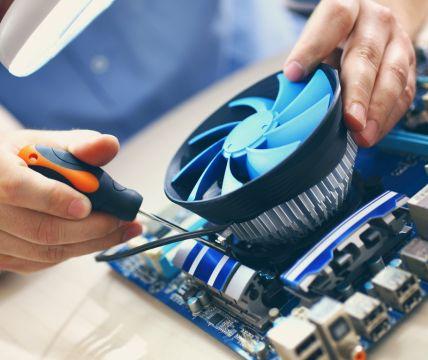
Dust accumulation is the primary culprit. Over time, dust settles on fans, heatsinks, and air vents, creating an insulating layer that prevents heat from escaping. A blocked cooling system forces your computer to work harder, raising internal temperatures beyond safe operating limits. Additionally, failing cooling fans, dried-out thermal paste between the CPU and cooler, and inadequate airflow in your workspace all contribute to thermal stress.
When temperatures spike, your system activates thermal throttling—it intentionally slows down to reduce heat production. This explains why your computer suddenly feels sluggish or freezes during demanding tasks.
How Auburn Techs Diagnoses Thermal Problems
When you bring your computer in, our technicians first run comprehensive thermal diagnostics using professional-grade monitoring tools. We check your system's internal temperature under various loads and identify where heat isn't dissipating properly. Computer Repairs Auburn professionals can spot problems invisible to the naked eye.
Once we've identified the issue, we perform a thorough internal cleaning, remove dust from all components, and replace or repair damaged fans. We'll reapply thermal paste to ensure optimal heat transfer between your CPU and cooler. If your cooling system has failed entirely, we can recommend and install upgraded cooling solutions tailored to your system's specifications.
2. Hard Drive and Storage Failures
Your hard drive stores everything—your operating system, applications, documents, photos, and memories. When it fails, you don't just lose performance; you risk losing irreplaceable data.
Signs of Drive Failure
Hard drive problems often announce themselves before catastrophic failure. You might hear strange clicking or beeping sounds emanating from your tower. Your computer might take forever to boot, or applications load with frustrating slowness. Files become corrupted or inaccessible. Sometimes your system doesn't recognize the drive at all.
These symptoms indicate mechanical wear, bad sectors developing on the platter, or firmware corruption. The longer you ignore these warning signs, the closer you push toward complete data loss.
Auburn Techs' Approach to Storage Solutions
Our technicians never guess with storage issues—we diagnose with precision. We use specialized software to analyze drive health, identify bad sectors, and assess whether recovery is possible. If your current drive is still functional, we might repair sectors and optimize performance. However, for severely damaged drives, we recommend replacement with modern alternatives like SSDs (solid-state drives).
SSDs offer massive advantages over traditional mechanical hard drives. They're faster, more reliable, generate less heat, and consume less power. We'll help you select the right capacity for your needs and handle the complete migration of your data from your old drive to your new one. Throughout the process, your files remain safe and secure.
3. Power Supply Failures and Electrical Issues
Your power supply isn't flashy or talked about much, but it's absolutely essential. It converts AC power from your wall outlet into the specific DC voltages your computer components require. When it fails, your entire system becomes paperweight.
Why Power Supplies Fail
Power supplies have a finite lifespan—typically 5 to 8 years. Capacitors inside degrade from heat and age, efficiency drops, and the unit becomes unreliable. Additionally, power surges from lightning strikes or electrical anomalies can instantly destroy a power supply. Poor ventilation, lack of maintenance, and continuous strain from high-demand components like gaming graphics cards also accelerate failure.
A dying power supply might cause random shutdowns, unexpected reboots, or failure to power on at all. Sometimes symptoms are subtle—like random crashes or data corruption—making diagnosis tricky without proper equipment.
How Auburn Techs Tests and Replaces Power Supplies
We use professional power supply testers to measure voltage output on every rail your system uses. Inconsistent voltage readings tell us the power supply is failing. We never perform temporary fixes here because a failing power supply can damage other expensive components like your motherboard, CPU, and graphics card.
Instead, we install a high-quality replacement power supply rated appropriately for your system's power draw. We source power supplies from trusted manufacturers and ensure wattage aligns with your current and future upgrade needs. Our installation includes stress testing to verify stability before returning your system.
4. Malware, Viruses, and Security Threats
Digital threats are invisible enemies that compromise your security, steal your data, and slow your computer to a crawl. Malware doesn't always announce its presence—it works quietly in the background, sometimes for months before you notice problems.
How Malware Impacts Your System
Malicious software consumes system resources, making your computer sluggish. It might hijack your web browser, display unwanted advertisements, or redirect searches to suspicious websites. Worse, sophisticated malware like spyware monitors your keystrokes, captures passwords, and exposes banking information. Ransomware encrypts your files and demands payment for decryption keys.
You can catch malware by clicking suspicious email attachments, visiting compromised websites, or downloading software from untrusted sources.
Auburn Techs' Multi-Layer Security Approach
We don't just run a quick antivirus scan and call it done. Our security process is comprehensive. First, we perform a complete system scan using multiple detection tools that catch threats individual antivirus programs might miss. We isolate and quarantine malicious files, then use specialized removal tools to eliminate deep-rooted infections.
Next, we install or update robust antivirus protection and configure your firewall for optimal security. We recommend strong passwords, enable two-factor authentication where possible, and advise you on safe browsing habits. For business clients, we implement more sophisticated solutions including endpoint protection and employee security training. Regular security audits ensure ongoing protection against evolving threats.
5. Outdated or Corrupted Operating System Issues
Your operating system is the bridge between you and your hardware. When Windows, macOS, or Linux becomes corrupted or falls dangerously outdated, everything suffers.
Operating System Problems Explained
Sometimes Windows files become corrupted from improper shutdowns, malware damage, or incomplete software updates. Your system might refuse to boot, display blue screen errors (the infamous "blue screen of death"), or continuously crash. Other times, your operating system simply becomes so outdated that security patches are unavailable, leaving you vulnerable to attacks, while software compatibility issues emerge as applications stop supporting ancient OS versions.
Bloated systems accumulate temporary files, broken registry entries, and conflicting settings that gradually degrade performance.
Auburn Techs' OS Repair and Upgrade Services
When your operating system acts up, we first attempt repairs using recovery tools and system file verification utilities. Many issues resolve without complete reinstallation. However, if your OS is severely corrupted or severely outdated, we perform a fresh installation with proper backup procedures to protect your important files.
We install the latest stable version appropriate for your hardware, apply all critical security updates and patches, and reinstall your essential applications. We handle driver installations for all your hardware components, ensuring everything communicates properly. For business clients, we can manage licensing, ensure compliance, and implement group policies for network security.
Prevention is Always Better Than Cure
While Auburn Techs excels at fixing broken computers, preventing problems in the first place saves money and headaches. Here's what you can do today to protect your system:
Update regularly when prompted—updates patch security vulnerabilities and fix bugs. Maintain good ventilation around your computer tower and periodically remove dust with compressed air. Use reputable antivirus software and keep it current. Create backups of critical data—either to an external drive or cloud storage. Shut down properly instead of forcing restarts. Avoid downloading files from suspicious sources. Be cautious with email attachments and links.
Get Professional Help When You Need It
Despite your best efforts, computer problems happen. When they do, don't panic and don't attempt risky DIY fixes that might worsen damage. Our team at Auburn Techs is here to help.
Whether your computer won't start, runs slowly, displays error messages, or shows any other sign of trouble, we'll diagnose the issue accurately and explain your options clearly. We stand behind our work and treat your computer with the same care we'd give our own machines.
Contact Auburn Techs today for a free diagnostic consultation. Let us restore your computer to reliable, fast performance so you can focus on what matters.

 English
 French
 Spanish
 Portuguese
 Deutsch
 Turkish
 Dutch
Dutch
 Italiano
 Russian
 Romaian
 Portuguese (Brazil)
 Greek
Greek